Redesign of a HR app
-
Problem
“Deliverables arrived ahead of schedule, enabling us to accelerate our own client commitments without risk.”
-
Approach
“Deliverables arrived ahead of schedule, enabling us to accelerate our own client commitments without risk.”
-
Evidence
“We observed immediate efficiency improvements after the implementation plan was executed precisely as outlined.”
-
My role
End-to-end ownership: research synthesis, IA & interaction design, UI, usability testing. Collaborated with PM (James Dashwood) and engineering on scoping and delivery.
HR Mobile App
Overview
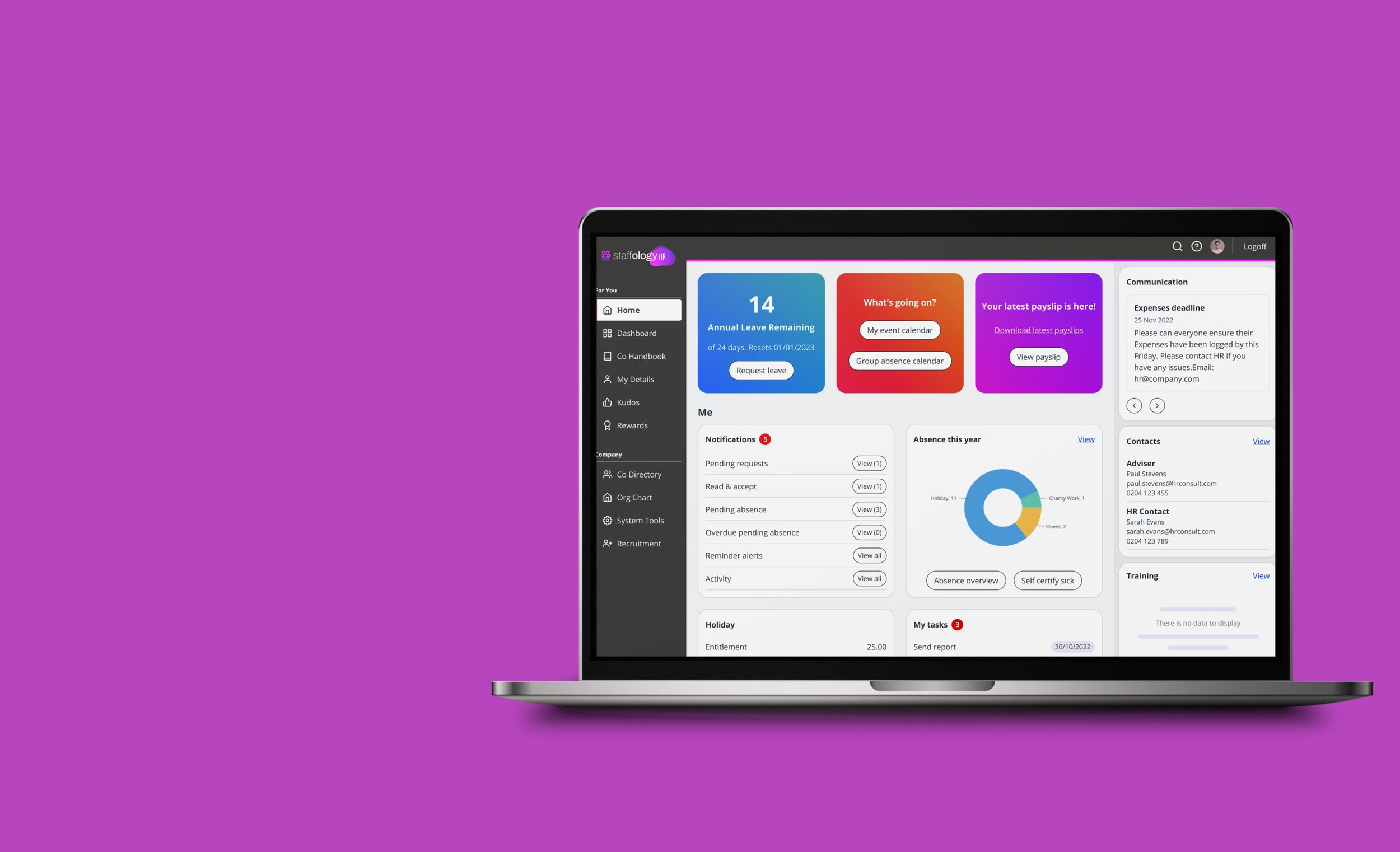
Staffology HR is a cloud-based human resources software designed for small to large-sized businesses. It provides a range of HR solutions, including employee onboarding, HR administration, time and attendance tracking, employee self-service, and more.
The platform automates many HR processes, reducing the workload of HR teams and providing more accurate and efficient data management.
Overall, Staffology HR is a comprehensive HR solution that can help businesses streamline their HR operations, increase efficiency, and save time and money.
Overview
Project: Staffology HR Mobile App Redesign
My Role: Product Designer
Duration: 9 months
Platform: iOS & Android
Goal
The goal of the redesign is to replace the old iOS and Android apps with a single cross-platform solution, providing a unified, mobile-first experience focused on users’ key actions, driven by the need to stay competitive with other HR apps and respond to user demand for a better mobile experience.
Background
Staffology HR is a cloud-based human resources platform designed to help businesses manage employee data, absences, performance, and other key HR tasks efficiently.
Before the redesign, Staffology HR had two separate mobile apps, one for Android and one for iOS. The two apps were completely different from each other: the iOS version was a simple native build with limited functionality and an outdated interface, while the Android version was a web app in a wrapper that offered more features but a poor mobile experience.
There were no analytics tools in place, so we had no visibility into how the apps were being used — how many people were using them, how often, or what features they relied on. This lack of data meant we were starting from zero in understanding user needs and behaviours.
To bridge this gap, we began the project with a round of user research to gather insights directly from employees and line managers about how they were using (or not using) the existing apps.
Research
The first round of research focused on understanding how people were using the existing mobile apps and where the main opportunities for improvement lay. We began with a short survey sent to Employees and Line Managers to learn how often they used the apps, which features they valued, and what they found frustrating. Alongside this, a competitor analysis helped us benchmark Staffology HR against other HR mobile solutions, highlighting best practices and areas where we could stand out.
The findings helped set a clear foundation for improvement.
Survey insights
Survey Overview
Total responses: 1,240
Respondents using the mobile app: 190 (15%)
Not using the app: 1,050 (85%)
Platform Split
iOS: 130 users (68%)
Android: 60 users (32%)
Frequency of Use (among app users)
Monthly: 37%
Weekly: 32%
Daily: 13%
Occasionally / Rarely: 18%
Top Reasons for Not Using the App
Not aware there was a mobile app – 910 responses (87%)
The app doesn’t work properly – 38 responses (4%)
No need to use it – 36 responses (3%)
Don’t like it / poor UX – 27 responses (3%)
Missing key features – 16 responses (2%)
User Satisfaction
Average rating: 2.98 / 5
Feedback highlights:
The app feels limited and awkward to use compared with the desktop version.
Repeated logins are a major frustration for many users.
The design and layout — especially on iOS — need improvement for clarity and consistency.
Competitor analysis takeaways
Focus on simplicity and ease of use
Competitors succeed by making core HR tasks — like booking leave or checking payslips — fast and intuitive. Staffology should prioritise clear, task-based design and minimal friction.Ensure feature parity across platforms
Many apps, like HiBob and BambooHR, offer fewer features on mobile. Staffology can stand out by providing a consistent, complete experience across desktop and mobile.Adopt a modern, engaging interface
Clean, well-structured visuals enhance credibility and align with user expectations from modern apps. A refreshed, mobile-first design reinforces Staffology’s professional image.Streamline navigation and hierarchy
Competitors often suffer from cluttered or confusing menus. A well-tested, intuitive structure will make frequent actions quick and effortless.Differentiate through employee empowerment
Building transparency and self-service tools into the mobile app supports engagement and positions Staffology as an employee-focused HR platform.Strategic advantage
By combining strong usability, modern design, and mobile consistency, Staffology can bridge the gap between simplicity-focused tools like CharlieHR and feature-rich systems like HiBob — securing a stronger competitive position.
Problem Definition
When we began the project, it was clear that both Employees and Line Managers were frustrated with the existing mobile apps. The experience felt inconsistent and outdated — the iOS app was too limited, while the Android app offered more features but was clunky and difficult to use. Simple tasks like checking payslips or booking leave often took longer than they should, and users quickly lost trust in the apps’ reliability.
From a business perspective, the goal was to bring the mobile experience up to speed with competitors and position Staffology HR as a modern, easy-to-use HR solution. However, we faced significant constraints: the new app had to be ready by the final quarter of the financial year, and the first release needed to be an MVP with feature parity to the old iOS app.
These challenges shaped our priorities — we needed to focus on creating a consistent, scalable foundation that would deliver immediate improvements for users while allowing the product to evolve over time.
Design Goals
The redesign focused on creating a unified, modern mobile experience that worked seamlessly across iOS and Android for both Employees and Line Managers. Our aim was to make everyday HR tasks—like booking leave, viewing payslips, and approving requests—simple, quick, and intuitive.
We also wanted to modernise the interface to bring Staffology HR in line with competitors, improving usability, accessibility, and visual consistency while maintaining the brand’s identity. With a tight timeline and an MVP scope, the focus was on building a solid, scalable foundation that could evolve and expand in future releases.
4. Problem Definition
Lack of consistency and parity between platforms.
Limited visibility into real user needs and behaviours.
Frustrating user experience due to slow performance and outdated design.
Need for a single, scalable app that serves both Employees and Line Managers.
5. Design Goals
Create a unified cross-platform experience.
Focus on simplicity and core HR tasks.
Improve usability, accessibility, and visual consistency.
Align the mobile experience with Staffology’s brand and web platform.
6. Design Process
Information Architecture: Consolidated key user journeys.
Wireframes: Defined core task flows (leave requests, payslips, approvals).
UI Design: Introduced a clean, modern interface using Staffology’s brand elements.
Prototyping & Testing: Iterated designs based on user feedback.
7. Outcome
A single, unified app for both iOS and Android.
Streamlined navigation and improved core task completion.
Positive feedback from early user testing.
Clearer path for future feature expansion.
8. Impact & Learnings
Improved usability and consistency across platforms.
Increased engagement (if you have metrics, include them here).
Highlight key takeaways — e.g., importance of early research when no analytics exist.
Ideation
Based on competitor apps and other mainstream app we designed the navigation
Wireframes
Testing
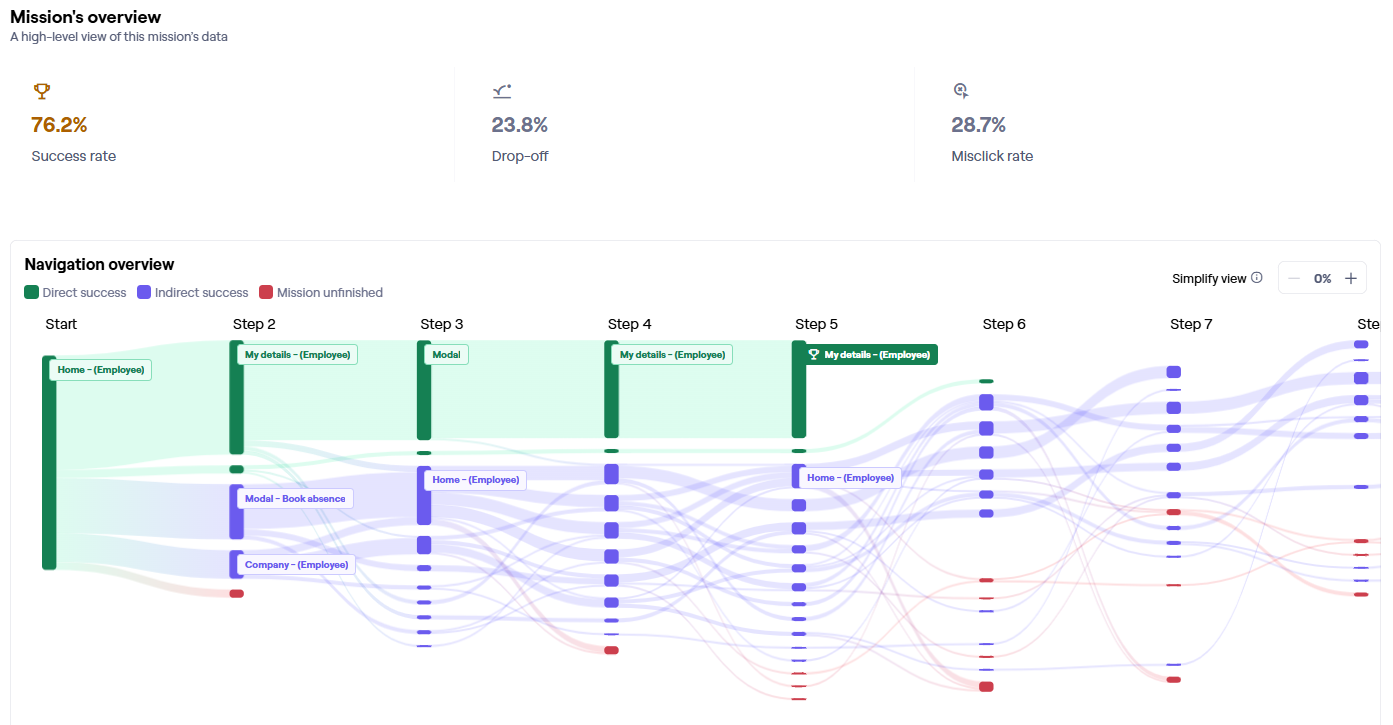
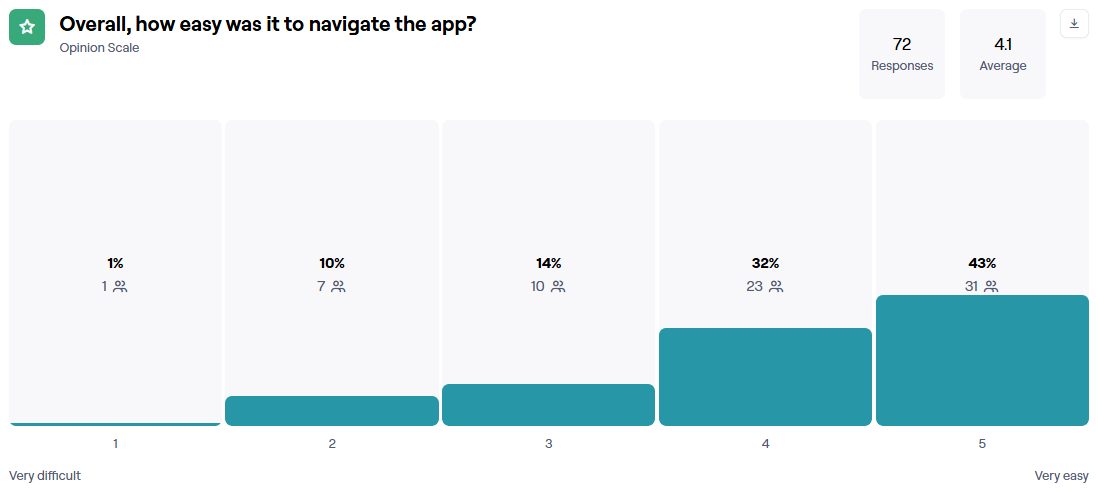
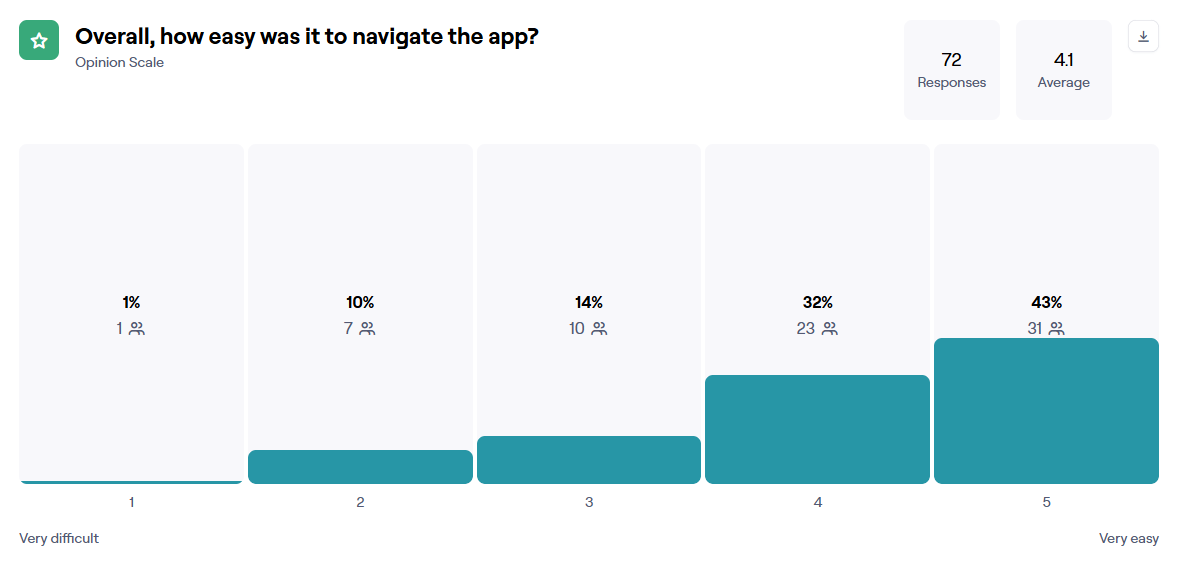
Once the basic layout was in place, we ran Maze user testing to validate key journeys like cancelling holidays, reading company updates, and finding handbook information. The results helped us spot usability issues early, confirm task efficiency, and refine the design before development.
Task 1 - Cancelling holidays
Testing Insights
Success rate: 76.2% of users successfully completed the task.
Drop-off rate: 23.8% of participants did not finish, indicating room for improvement in task clarity or navigation flow.
Misclick rate: 28.7%, showing that nearly one-third of users clicked on unintended elements — a sign of possible confusion with icons, labels, or layout.
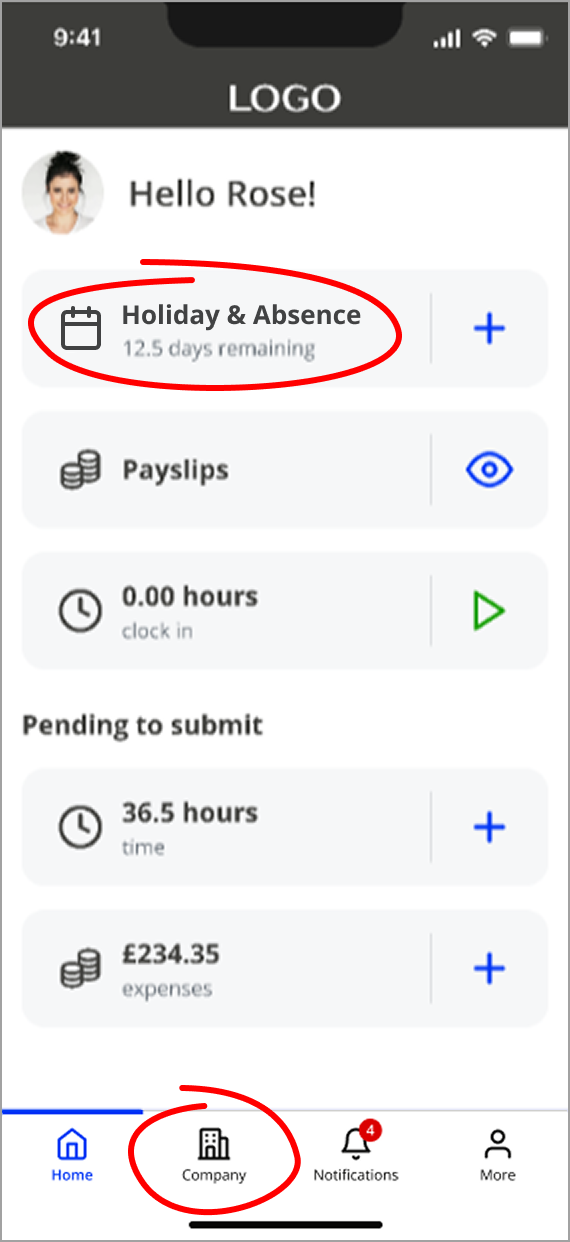
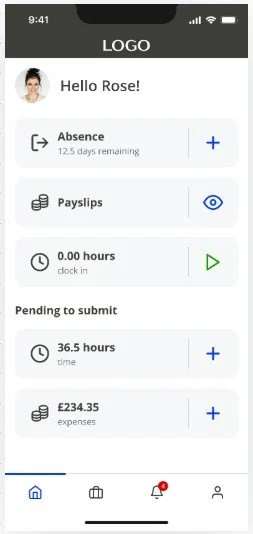
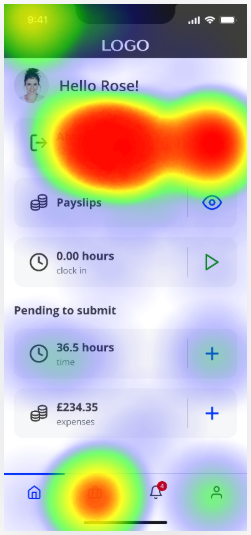
During testing, many users clicked the Company section (briefcase icon) when trying to cancel a holiday, mistaking it for a holiday symbol.
Testing also revealed that the term “Absence”, which covers all types of leave — including holiday, sickness, compassionate, and maternity — wasn’t always associated with holidays, causing confusion.
Navigation Patterns
The majority of users reached the goal through the expected flow (Home → My details → Task completion), showing a generally intuitive journey.
A notable number of users navigated to “Company” or “Book absence” early in the task, suggesting misinterpretation of icons or menu labels.
We replaced the Company section icon with a clearer, more intuitive alternative and added labels to all the menu items.
Since requesting holidays is the most common action, we updated the label to “Holiday & Absence” to make it clearer.
Testing
It all begins with an idea. Maybe you want to launch a business. Maybe you want to turn a hobby into something more. Or maybe you have a creative project to share with the world. Whatever it is, the way you tell your story online can make all the difference.
Don’t worry about sounding professional. Sound like you. There are over 1.5 billion websites out there, but your story is what’s going to separate this one from the rest. If you read the words back and don’t hear your own voice in your head, that’s a good sign you still have more work to do.
Summary
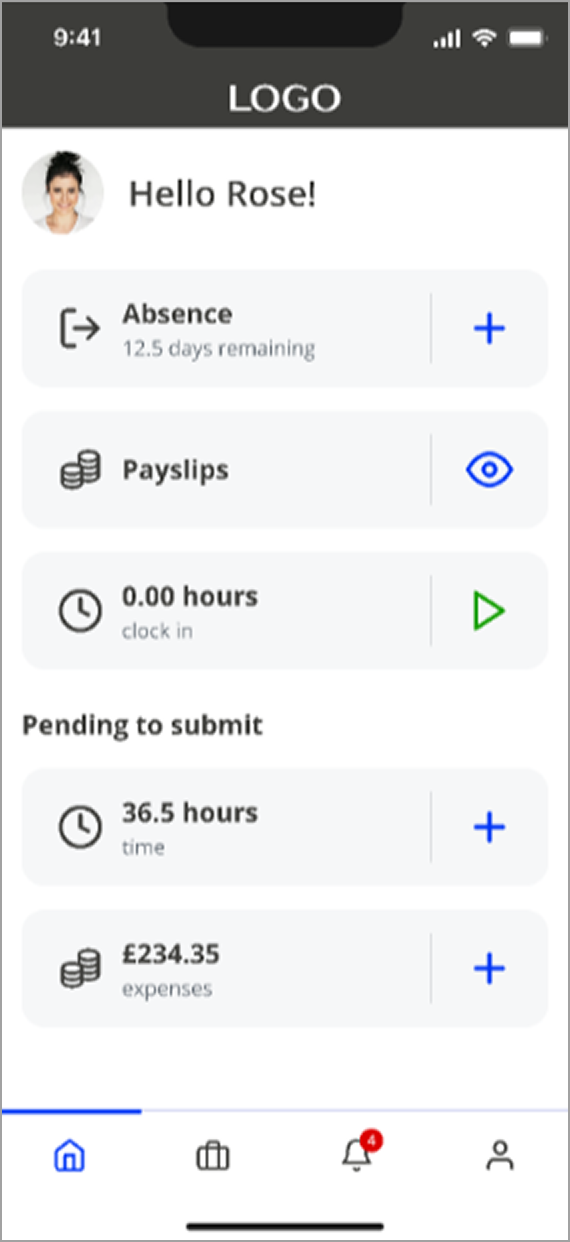
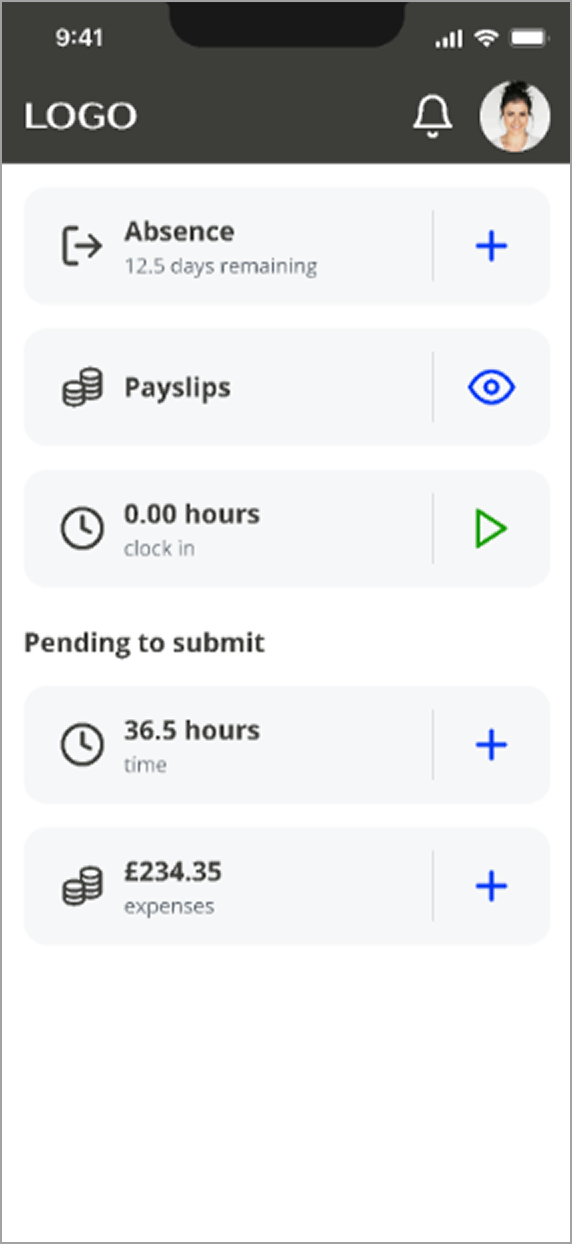
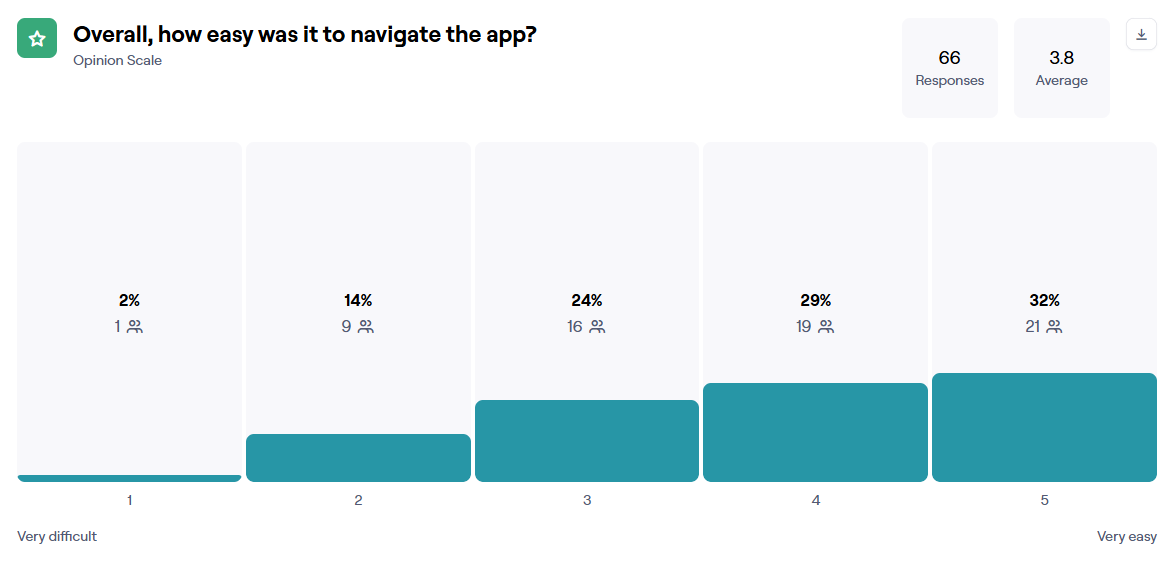
Following the release of the new Home page design, we conducted a user survey to gather feedback. Overall, users responded positively, but some expressed a desire for more customisation options such as customising widgets and colour schemes to align with their branding.
Users' feedback reinforced our initial plan to increase the Home page flexibility by enabling users to customise it to their needs. Customising the home page colours was an easier task and was launched shortly after the initial release
Final designs

Other projects

Field Marketing app

Contract builder

Smart document library